

The Dynamic Pricing Problem
Not all products have a fixed price. Made-to-measure curtains, custom furniture, configurable jewelry, bespoke clothing, these are products where the final price depends on customer-provided inputs: width, height, fabric, finish. Shopify's native pricing model assumes every variant has a predetermined price set in the admin. When the price is calculated at the point of interaction, based on a formula the merchant defines, you need a mechanism to adjust the cart line price dynamically.
Shopify's Cart Transform Function solves the mechanics: it can modify line item prices before checkout. But the mechanics alone create a dangerous security gap. The calculated price originates on the client side (JavaScript running in the browser). If you pass that price to the Cart Transform via a cart line attribute, any customer with browser DevTools can modify the attribute value before submission, giving themselves whatever price they want.
This article presents a production-tested solution: using Shopify's search template as a zero-cost, server-side hash verification API that cryptographically signs each price calculation before it reaches the cart.
The Security Gap
Consider the naive approach to dynamic pricing. JavaScript calculates the price based on customer measurements. JavaScript adds the item to cart with properties: { _target_price: "45.00" }. The Cart Transform reads _target_price from line attributes and applies it.
The problem: that second step is entirely client-controlled. A customer can open DevTools, switch to the Network tab, intercept the /cart/add.js request, and change _target_price to 0.01. Or they can paste a one-liner into the browser console:
fetch('/cart/add.js', {
  method: 'POST',
  headers: { 'Content-Type': 'application/json' },
  body: JSON.stringify({
    id: 12345,
    quantity: 1,
    properties: { _target_price: '0.01' }
  })
})
Without verification, the Cart Transform blindly trusts the client-provided price. This is equivalent to letting customers set their own prices at checkout.
The standard fix is to host a backend server that generates a signed token. The client sends measurement inputs to the backend, the backend calculates the price and returns a cryptographic hash, and the Cart Transform verifies the hash server-side. This works, but it means maintaining a server for what is essentially a hashing operation, adding infrastructure cost, deployment complexity, and another point of failure.
Price verification is non-negotiable. Any price data that originates from the client must be verified server-side before it affects checkout. This principle applies to all commerce platforms, not just Shopify. The question is where that server-side verification happens.
The Architecture, Search Template as a Hash API
Here is the key insight. Shopify themes include a Liquid rendering engine that runs server-side. Liquid templates are executed on Shopify's infrastructure, they have access to a sha256 filter, which generates cryptographic hashes. If we can call a Liquid template with parameters and get back a hash, we have a server-side hash generator with zero external infrastructure.
Shopify's alternate template feature lets you request any page with a custom template view: ?view=custom-template-handle. Combined with the search page, you can pass arbitrary parameters as the search query and get back custom JSON output rendered by Liquid.
The flow works like this:
1. JavaScript calculates the price from customer measurements.
2. JavaScript calls /search?view=hash-api&q=VARIANT_ID--QUANTITY--PRICE.
3. The search template (Liquid, server-side) parses the parameters, combines them with a SECRET key, and generates a SHA256 hash.
4. It returns JSON: { "hash": "115fb979...", "variantId": "...", "price": "..." }.
5. JavaScript adds the item to cart with the hash AND the price as line attributes.
6. The Cart Transform reads the line attributes, recreates the hash using the SAME secret key, and compares.
7. If hashes match, the price is legitimate, apply it. If not, reject.
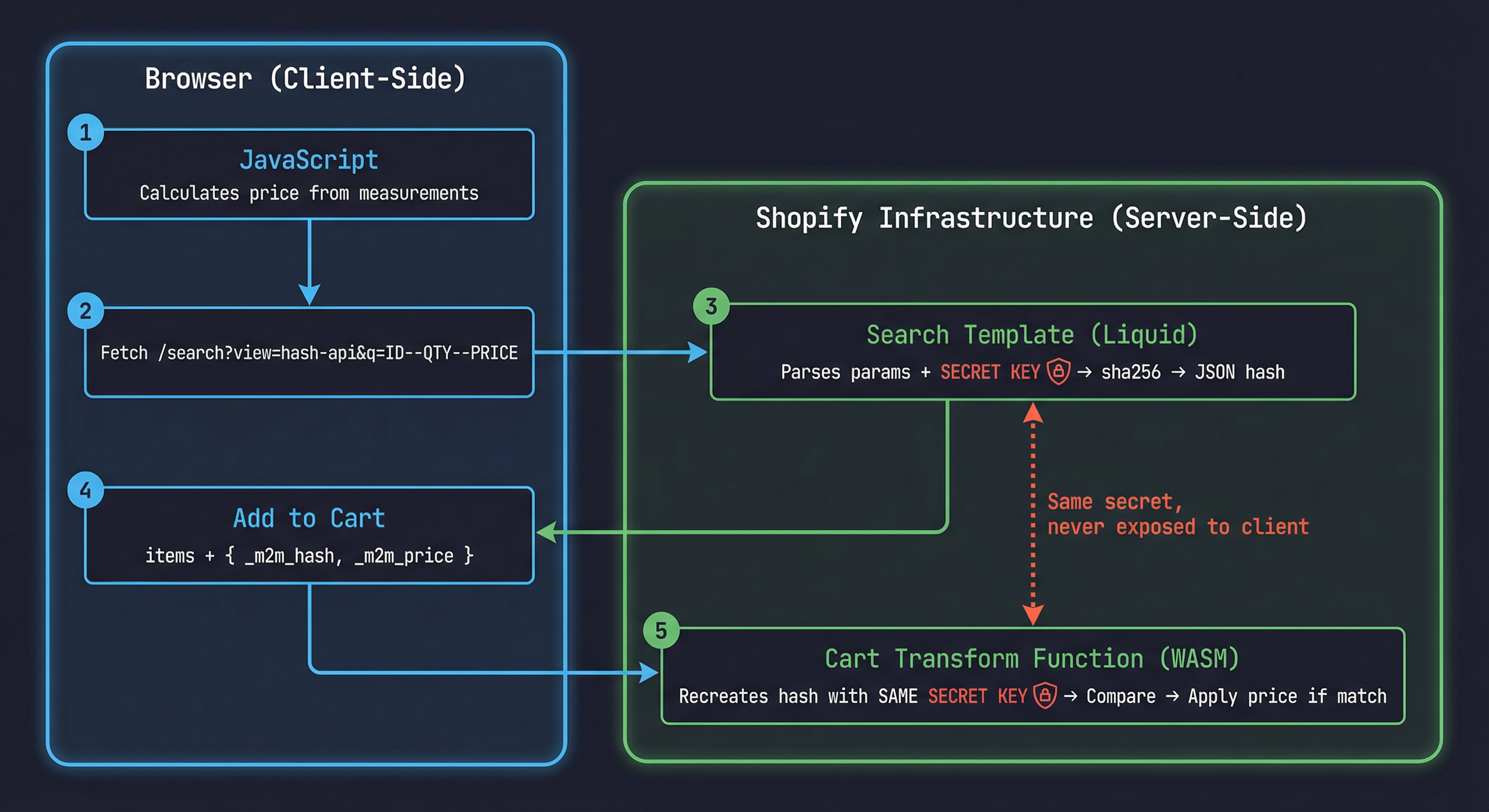
The secret key exists in two places: the Liquid template (server-side) and the Cart Transform function (also server-side, compiled to WASM). The client never sees the key, only the hash output.
Zero infrastructure cost. This architecture costs nothing to operate. No external server, no database, no API gateway. Shopify's own infrastructure handles the hash generation via Liquid rendering. The "API endpoint" is just a theme template.
Live demo: See the hash API in action on a real Shopify store, reima-benson-plus.myshopify.com/search?view=hash-api&q=53029948358974--2--37060 (password: shopify). This request passes variant 53029948358974, quantity 2, and price 37060 (cents), and returns the SHA256 hash computed server-side by Liquid. Try changing any parameter in the URL and watch the hash change.
Why the Search Template (Not Other Templates)
Shopify's backend architecture caches template responses aggressively for performance. Product pages, collection pages, and other standard templates may return cached HTML even when query parameters change. This means a ?view=hash-api on a product page might return a stale hash from a previous request with different parameters.
The search template is the exception. Search queries are inherently dynamic and unique, Shopify does not cache search results because the search term is always different. When you hit /search?q=12345--2--4500, Shopify processes the Liquid template fresh every time because the search context changes with each query.
This is why the parameters are passed as the search term (q parameter / search.terms in Liquid) rather than as custom query parameters. The search term is what drives the uncached rendering.
Other templates will serve cached responses. If you try this approach with products/any-product?view=hash-api&variant=123&price=45, Shopify may serve a cached version of the template that doesn't reflect the current parameters. The search template avoids this entirely because search.terms is always processed fresh.
Case Study, Made-to-Measure Curtain Pricing
A home furnishing store sells made-to-measure curtains. The customer selects a fabric type (already a Shopify variant), enters width in centimeters (50–400cm), height in centimeters (50–300cm), and chooses a lining option (yes or no).
The price formula: base_price_per_sqm × (width_cm / 100) × (height_cm / 100) + lining_surcharge
Example: Linen fabric at $80/sqm, 180cm × 240cm, with lining ($25 surcharge):
$80 × 1.8 × 2.4 + $25 = $370.60
This price doesn't exist as a Shopify variant. It's calculated at interaction time. The challenge: get $370.60 into the cart securely, so the customer can't change it to $3.70.
Step 1, The Search Template Hash Generator
Create a template file at templates/search.hash-api.liquid:
{%- layout none -%}

{%- assign query_param = search.terms -%}
{%- if query_param != '' -%}
  {%- assign parts = query_param | split: '--' -%}
  {%- if parts.size == 3 -%}
    {%- assign product_id = parts[0] -%}
    {%- assign quantity = parts[1] -%}
    {%- assign price = parts[2] -%}
    {%- assign seed = 'STOREFRONT::M2M_PRICING::VERIFY::b7f2e9a1' -%}
    {%- assign hash_input = quantity | append: '--gid://shopify/ProductVariant/' | append: product_id | append: '--' | append: price | append: '--' | append: seed -%}
    {%- assign hash_value = hash_input | sha256 -%}
    { "hash": "{{ hash_value }}", "variantId": "{{ product_id }}", "quantity": "{{ quantity }}", "price": "{{ price }}" }
  {%- else -%}
    { "error": "Invalid query format" }
  {%- endif -%}
{%- else -%}
  { "error": "Query parameter is required" }
{%- endif -%}
{%- layout none -%} renders raw output without the theme layout, no header, footer, or CSS. Just the JSON. search.terms is the raw search query string from the q parameter. The -- separator splits variant ID, quantity, and price into discrete parameters.
The seed is the secret key. This string exists only in the Liquid template (server-side) and in the Cart Transform function. It never reaches the browser. hash_input reconstructs the full parameter string in a specific order, including the full GID format (gid://shopify/ProductVariant/), ensuring any change to any parameter produces a completely different hash.
The URL to call this template: /search?view=hash-api&q=VARIANT_ID--QUANTITY--PRICE
Example: /search?view=hash-api&q=53029948358974--2--37060
Prices are in cents (integer) to avoid floating-point precision issues. $370.60 becomes 37060.
Layout none is essential. Without {%- layout none -%}, Shopify wraps the JSON in the full theme layout HTML, making it unparseable. With layout none, you get clean JSON output, effectively turning this template into a REST endpoint.
Step 2, Requesting the Hash and Adding to Cart
The client-side JavaScript calculates the price from measurement inputs, calls the search template "API" to get the hash, and adds the item to cart with the hash, price, and measurements as line attributes.
class MadeToMeasurePricing {
  constructor(config) {
    this.basePricePerSqm = config.basePricePerSqm;
    this.liningSurcharge = config.liningSurcharge || 0;
  }

  calculatePrice(widthCm, heightCm, hasLining) {
    const sqm = (widthCm / 100) * (heightCm / 100);
    let price = this.basePricePerSqm * sqm;
    if (hasLining) price += this.liningSurcharge;
    return Math.round(price * 100);
  }

  async getVerificationHash(variantId, quantity, priceCents) {
    const query = `${variantId}--${quantity}--${priceCents}`;
    const url = `/search?view=hash-api&q=${encodeURIComponent(query)}`;

    const response = await fetch(url);
    const text = await response.text();
    const data = JSON.parse(text.trim());

    if (data.error) {
      throw new Error(`Hash API error: ${data.error}`);
    }

    return data;
  }

  async addToCart(variantId, quantity, widthCm, heightCm, hasLining) {
    const priceCents = this.calculatePrice(widthCm, heightCm, hasLining);
    const hashData = await this.getVerificationHash(variantId, quantity, priceCents);

    const response = await fetch('/cart/add.js', {
      method: 'POST',
      headers: { 'Content-Type': 'application/json' },
      body: JSON.stringify({
        items: [{
          id: parseInt(variantId),
          quantity: quantity,
          properties: {
            _m2m_hash: hashData.hash,
            _m2m_price: String(priceCents),
            _m2m_quantity: String(quantity),
            'Width (cm)': String(widthCm),
            'Height (cm)': String(heightCm),
            'Lining': hasLining ? 'Yes' : 'No',
          }
        }]
      })
    });

    return response.json();
  }
}

const pricing = new MadeToMeasurePricing({
  basePricePerSqm: 80,
  liningSurcharge: 25,
});

document.getElementById('add-to-cart').addEventListener('click', async () => {
  const variantId = document.getElementById('variant-select').value;
  const width = parseInt(document.getElementById('width-input').value);
  const height = parseInt(document.getElementById('height-input').value);
  const lining = document.getElementById('lining-checkbox').checked;

  await pricing.addToCart(variantId, 1, width, height, lining);
});
Properties prefixed with _ (underscore) are hidden from the customer in checkout and order confirmation emails, a Shopify convention for internal data. The hash, price, and quantity are stored as line attributes so the Cart Transform can read them. Width, Height, and Lining (without the _ prefix) are visible to the customer as line item properties on their order.
Underscore prefix convention. Line item properties starting with _ are hidden from the storefront and order confirmation emails. Use this for internal data like hashes and raw price values. Customer-facing properties (Width, Height, Lining) should not start with underscore.
Step 3, The Cart Transform Function
The Cart Transform function reads line attributes, recreates the hash using the same secret key, compares, and applies the price if valid. First, the input query tells Shopify which cart data to pass into the function:
query Input {
  cart {
    lines {
      id
      quantity
      merchandise {
        ... on ProductVariant {
          id
        }
      }
      m2mHash: attribute(key: "_m2m_hash") {
        value
      }
      m2mPrice: attribute(key: "_m2m_price") {
        value
      }
      m2mQuantity: attribute(key: "_m2m_quantity") {
        value
      }
    }
  }
}
Cart Transform can read individual line attributes by key using the attribute field with aliases. Each attribute is queried separately, giving you strongly typed access to the hash, price, and quantity values.
The run function processes each cart line, verifies the hash, and applies the dynamic price:
// @ts-check

/**
 * @param {RunInput} input
 * @returns {FunctionRunResult}
 */
export function run(input) {
  const operations = [];
  const SECRET_SEED = 'STOREFRONT::M2M_PRICING::VERIFY::b7f2e9a1';

  for (const line of input.cart.lines) {
    const hashAttr = line.m2mHash?.value;
    const priceAttr = line.m2mPrice?.value;
    const quantityAttr = line.m2mQuantity?.value;
    const variantId = line.merchandise?.id;

    if (!hashAttr || !priceAttr || !quantityAttr || !variantId) {
      continue;
    }

    const hashInput = `${quantityAttr}--${variantId}--${priceAttr}--${SECRET_SEED}`;
    const computedHash = sha256(hashInput);

    if (computedHash !== hashAttr) {
      continue;
    }

    const priceInCents = parseInt(priceAttr, 10);

    operations.push({
      update: {
        cartLineId: line.id,
        price: {
          adjustment: {
            fixedPricePerUnit: {
              amount: (priceInCents / 100).toFixed(2),
            },
          },
        },
      },
    });
  }

  return { operations };
}
Seed synchronization is critical. The SECRET_SEED in the Cart Transform function MUST be identical to the seed in the Liquid template. If they differ by even one character, every hash comparison will fail and no dynamic prices will be applied. Keep this value in sync across both files.
The Pure SHA256 Implementation
Shopify Functions run in a sandboxed WebAssembly environment. You cannot import Node.js crypto, and external npm packages add bundle size. A pure JavaScript SHA256 implementation is the right approach, it's compact, has no dependencies, and produces identical output to Liquid's sha256 filter.
function sha256(message) {
  function rightRotate(value, amount) {
    return (value >>> amount) | (value << (32 - amount));
  }

  const K = [
    0x428a2f98, 0x71374491, 0xb5c0fbcf, 0xe9b5dba5,
    0x3956c25b, 0x59f111f1, 0x923f82a4, 0xab1c5ed5,
    0xd807aa98, 0x12835b01, 0x243185be, 0x550c7dc3,
    0x72be5d74, 0x80deb1fe, 0x9bdc06a7, 0xc19bf174,
    0xe49b69c1, 0xefbe4786, 0x0fc19dc6, 0x240ca1cc,
    0x2de92c6f, 0x4a7484aa, 0x5cb0a9dc, 0x76f988da,
    0x983e5152, 0xa831c66d, 0xb00327c8, 0xbf597fc7,
    0xc6e00bf3, 0xd5a79147, 0x06ca6351, 0x14292967,
    0x27b70a85, 0x2e1b2138, 0x4d2c6dfc, 0x53380d13,
    0x650a7354, 0x766a0abb, 0x81c2c92e, 0x92722c85,
    0xa2bfe8a1, 0xa81a664b, 0xc24b8b70, 0xc76c51a3,
    0xd192e819, 0xd6990624, 0xf40e3585, 0x106aa070,
    0x19a4c116, 0x1e376c08, 0x2748774c, 0x34b0bcb5,
    0x391c0cb3, 0x4ed8aa4a, 0x5b9cca4f, 0x682e6ff3,
    0x748f82ee, 0x78a5636f, 0x84c87814, 0x8cc70208,
    0x90befffa, 0xa4506ceb, 0xbef9a3f7, 0xc67178f2,
  ];

  const msgBytes = [];
  for (let i = 0; i < message.length; i++) {
    msgBytes.push(message.charCodeAt(i));
  }
  msgBytes.push(0x80);

  while (msgBytes.length % 64 !== 56) {
    msgBytes.push(0);
  }

  const bitLength = message.length * 8;
  for (let i = 56; i >= 0; i -= 8) {
    msgBytes.push((bitLength / Math.pow(2, i)) & 0xff);
  }

  let h0 = 0x6a09e667, h1 = 0xbb67ae85, h2 = 0x3c6ef372, h3 = 0xa54ff53a;
  let h4 = 0x510e527f, h5 = 0x9b05688c, h6 = 0x1f83d9ab, h7 = 0x5be0cd19;

  for (let offset = 0; offset < msgBytes.length; offset += 64) {
    const w = new Array(64);
    for (let i = 0; i < 16; i++) {
      w[i] = (msgBytes[offset + i * 4] << 24)
           | (msgBytes[offset + i * 4 + 1] << 16)
           | (msgBytes[offset + i * 4 + 2] << 8)
           | msgBytes[offset + i * 4 + 3];
    }

    for (let i = 16; i < 64; i++) {
      const s0 = rightRotate(w[i - 15], 7) ^ rightRotate(w[i - 15], 18) ^ (w[i - 15] >>> 3);
      const s1 = rightRotate(w[i - 2], 17) ^ rightRotate(w[i - 2], 19) ^ (w[i - 2] >>> 10);
      w[i] = (w[i - 16] + s0 + w[i - 7] + s1) | 0;
    }

    let a = h0, b = h1, c = h2, d = h3;
    let e = h4, f = h5, g = h6, h = h7;

    for (let i = 0; i < 64; i++) {
      const S1 = rightRotate(e, 6) ^ rightRotate(e, 11) ^ rightRotate(e, 25);
      const ch = (e & f) ^ (~e & g);
      const temp1 = (h + S1 + ch + K[i] + w[i]) | 0;
      const S0 = rightRotate(a, 2) ^ rightRotate(a, 13) ^ rightRotate(a, 22);
      const maj = (a & b) ^ (a & c) ^ (b & c);
      const temp2 = (S0 + maj) | 0;

      h = g; g = f; f = e; e = (d + temp1) | 0;
      d = c; c = b; b = a; a = (temp1 + temp2) | 0;
    }

    h0 = (h0 + a) | 0; h1 = (h1 + b) | 0;
    h2 = (h2 + c) | 0; h3 = (h3 + d) | 0;
    h4 = (h4 + e) | 0; h5 = (h5 + f) | 0;
    h6 = (h6 + g) | 0; h7 = (h7 + h) | 0;
  }

  function hex(n) {
    return ('00000000' + (n >>> 0).toString(16)).slice(-8);
  }

  return hex(h0) + hex(h1) + hex(h2) + hex(h3)
       + hex(h4) + hex(h5) + hex(h6) + hex(h7);
}
ASCII-only input. This implementation handles ASCII input, which is sufficient for the hash verification use case, variant IDs, prices, and the seed string are all ASCII. If you need to hash Unicode strings, convert to UTF-8 bytes first.
Deploying and Activating the Cart Transform
The extension configuration tells Shopify how to build and target the function:
api_version = "2025-01"

[[extensions]]
name = "m2m-dynamic-pricing"
handle = "m2m-dynamic-pricing"
type = "function"
api_version = "2025-01"

[extensions.build]
command = ""
path = "dist/function.wasm"

[extensions.ui.paths]
create = "/"
details = "/"

[extensions.targeting]

  [[extensions.targeting.target]]
  target = "purchase.cart-transform.run"
  input_query = "src/input.graphql"
  export = "run"
Build and deploy with the Shopify CLI:
shopify app function typegen
shopify app function build
shopify app deploy
After deploying, query the available functions to find your function's ID:
query GetFunctions {
  shopifyFunctions(first: 25, apiType: "cart_transform") {
    nodes {
      app { title }
      apiType
      title
      id
    }
  }
}
Then activate the Cart Transform by creating it with the function ID:
mutation CreateCartTransform {
  cartTransformCreate(
    functionId: "YOUR_FUNCTION_ID"
  ) {
    cartTransform {
      id
      functionId
    }
    userErrors {
      field
      message
    }
  }
}
Use functionId, not functionHandle. The functionHandle field is unreliable and may not resolve correctly. Query shopifyFunctions to find the correct id for your function, then pass it as functionId when creating the Cart Transform.
Security Analysis
What the client sees: The browser can observe the /search?view=hash-api&q=... request and response. It sees the hash output but NOT the secret seed inside the Liquid template. Even if a customer inspects the network request, they see the hash, but they cannot reverse SHA256 to discover the seed.
What an attacker would need to do: First, discover the secret seed, it's in the Liquid template source, which is not publicly accessible (Shopify serves rendered output, not template source code). Then, correctly reproduce the hash input format (parameter order, GID prefix, separators). Finally, generate a valid SHA256 hash for the forged price. Without the seed, generating a valid hash for a different price is computationally infeasible due to SHA256 preimage resistance.
Defense in depth: The secret seed in the Liquid template is never sent to the browser. The secret seed in the Cart Transform function is compiled to WASM and not inspectable at runtime. The hash binds ALL parameters together, changing the price, quantity, or variant ID invalidates the hash. And the Cart Transform silently ignores invalid hashes, providing no error message that reveals what went wrong.
Rotate your secret seed periodically. When you update the seed, change it in BOTH the Liquid template and the Cart Transform function simultaneously, then redeploy. Orders with the old hash that haven't completed checkout will fail verification, handle this gracefully in your UX by re-calculating the hash on page load.
Edge Cases and Production Considerations
Quantity changes in cart. If the customer changes quantity in the cart after adding, the hash becomes invalid because quantity is part of the hash input. Handle this by either re-fetching the hash when quantity changes (via AJAX cart listeners), or by excluding quantity from the hash and using the Cart Transform's built-in quantity handling. The template shown includes quantity for maximum security.
Multi-currency stores. The price in the hash should be in the store's base currency, the currency used by Cart Transform. If the storefront displays a presentment currency, convert back to the base currency before hashing.
Price as integer (cents). Always use integer cents (e.g., 37060 for $370.60) to avoid floating-point precision issues. Both the Liquid template and the JavaScript calculation must agree on the format.
Rate limiting. Shopify's search endpoint is not rate-limited in the same way as the Admin API, but extremely high volumes of search requests may trigger throttling. For typical product page usage, one hash request per add-to-cart, this is not a concern.
SEO impact. The search template uses {%- layout none -%}, so it returns raw JSON, not HTML. Search engines won't index it. Add &type=product to the URL if you want to be extra safe: /search?view=hash-api&type=product&q=....
Template discoverability. The template file name (search.hash-api.liquid) is technically guessable. An attacker could call it, but they only get a hash back. Without the seed, the hash is useless for forging prices. The template's existence is not a vulnerability.
Cart Transform execution order. If multiple Cart Transform functions are active, they execute in order of creation. Ensure your dynamic pricing function runs before any discount functions that might interfere with the adjusted price.
Key Takeaways
Dynamic pricing requires server-side verification. Any price calculated in the browser can be tampered with before it reaches checkout.
Shopify's search template is a zero-cost server-side API. Liquid's sha256 filter generates cryptographic hashes without external infrastructure.
Use the search template specifically, other Shopify templates cache responses and may return stale hashes.
The secret seed is the linchpin. It exists only in the Liquid template and the Cart Transform function, never in the browser. Guard it like a private key.
Pure JavaScript SHA256 works in Shopify Functions. No external libraries needed, the implementation is compact and produces identical output to Liquid's sha256 filter.
Bind all parameters into the hash. Variant ID, quantity, and price are all included. Changing any one value invalidates the hash.
This pattern extends beyond pricing. Any operation where client-provided data needs server-side verification can use the search template hash approach.
If your Shopify store needs custom pricing logic for configurable or made-to-measure products, I can help you architect a secure dynamic pricing system using Cart Transform Functions. Let's talk about what your pricing model actually needs.